
So you've got an internet connected ESP32 doing some cool job and posting data to your webserver.
You want to add a feature to it.
After you've coded your feature, you could go and find the thing, take it out of its box, plug it into your computer and flash the new firmware to it. All a bit long...
Wouldn't it be better to make your code changes, push to your version control, and have the esp32 find the update, download it, and start running it automatically? Let's do it.
OTA updates system design
We're going to use Github releases to package up new versions of our ESP32 firmware for our device.
Periodically we will get the ESP32 to check the latest release version on Github. If the latest version is different from the version the ESP32 is running, we will download the tarball, extract it and copy it over our current firmware filesystem before restarting the device so it runs the latest version of our code
In order to achieve this, we are going to need to be able to query the github API to find out what the latest release is, and download it if neccessary.
We could query github direct from the ESP32, however this would require storing a github auth token on the device. This has a few drawbacks:
- The device has direct access to github, and if someone plugs their computer into your esp32, they could access the github token and potentially access things they have no business accessing.
- If/when the token expires, the device will end up stuck on whatever version it is currently running. There will be no way to update the device going forwards.
A better approach might be to add a few endpoints to your web server, which themselves query github and return the requested information to the esp32. The esp32 can then make a call to your server to get a hold of the latest firmware information. This mitigates the above issues as:
- The device only has access to your server (whose behaviour you are in control of)
- If the Github token expires, you can issue a new one on Github and update your server. No need to go and find the esp32 to update a token.
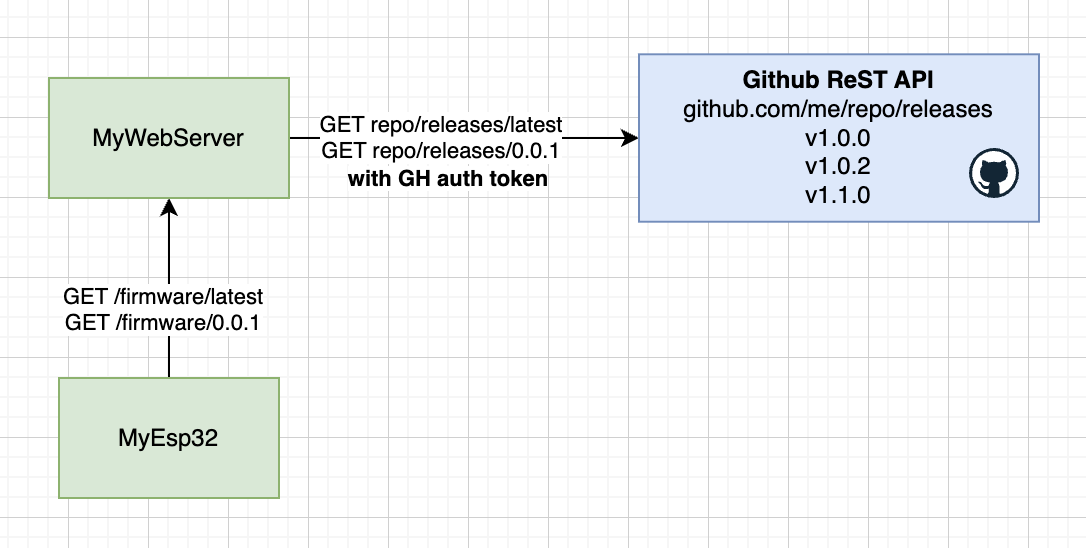
The webserver
We'll need a little webserver so the microcontroller has someone to talk to. The server will have a couple of endpoints:
GET /firmware/latest
The ESP32 will call this endpoint when it wants to check to see if there is an update for it.
The server will make a call to the Github ReST API to ask for the latest release version of the firmware. It's gonna respond to the ESP32 with the current latest version, and a URL the ESP32 can call to download that version:
Example response:
200 OK
Content-type: application/json
{
	"version": "v1.0.1",
	"url": "https://mywebserver.com/firmware/v1.0.1"
}
GET /firmware/[versionNumber]
The ESP32 will call this endpoint when it wants to download a version of the firmware to install it.
The server will make a call to Github to get the tarball associated with the release it was asked for, and send the response back down to the ESP32
Example response:
200 OK
Content-type: application/x-gzip
[[tarball]]
Example server
You can grab a node implementation of this server from blog-esp32-ota-updates-server
The firmware
The firmware can be found here.
We have a basic esp32 micropython firmware. The program does the following:
- Wakes up
- Connects to local wifi network
- Check github (via your own web server) to see if there are any newer versions of the firmware - if so, download and update the firmware, then restart
- flashes the built in LED
- Goes to sleep for one minute
The readme explains how to deploy the firmware to your device.
How it works
The firmware makes use of an OTAUpdater class
This thing calls the webserver /firmware/latest endpoint to find the latest release on github.
It compares the release tag to the local version in the version.md file.
If the latest version on github differs from the version running on the device, it calls the webserver /firmware/[versionNumber] endpoint, which hands the device the latest release tarball.
The OTAUpdater extracts all the files, copies them over the current firmware files, and restarts the device.
Making new releases
Too make a new release, we need to do 2 things:
Bump the version number on the firmware repository in the version file
Create a new release for the firmware repository. The release tag must match the string found in the the version file
Notes: Ignoring files in releases
You probably don't want your whole repository packaged up and sent down to the device when it updates. You can use export-ignore in the .gitattributes file to ignore files and directories when making a release
Bonus points for creating a github action to make your releases - Just make sure to make that thing also bump the version number in the version file